Video has become one of the most popular ways to share information online. Businesses use it to introduce products, educators create tutorials, and content creators use short clips to connect with audiences. However, traditional video production can require cameras, recording equipment, editing software, and considerable time. Even a short promotional video may involve several stages of planning and production.
Artificial intelligence is changing this process. Modern AI tools can turn written ideas into videos, animate still photographs, generate digital presenters, and synchronise speech with facial movements. These developments are making video creation more accessible to people who do not have professional production experience.
Understanding how these technologies work can help individuals and businesses decide where AI fits into their creative process.
Why AI Video Creation Is Becoming Popular
Traditional video production involves more than recording footage. Creators must consider lighting, backgrounds, camera angles, sound quality, editing, and the final format. For organisations that publish content regularly, repeating these tasks can become expensive and time-consuming.
AI-powered platforms offer alternative ways to approach some of these challenges. Users can start with a script, photograph, or existing recording and use automated features to produce or improve video content.
This can be particularly useful for small businesses, independent creators, educators, and marketing teams. Someone preparing a product introduction, for example, may not have access to a recording studio or professional presenter. AI-generated presenters and video templates can provide another option.
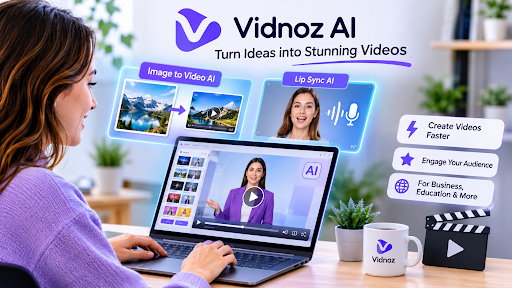
Platforms such as Vidnoz AI bring different video creation capabilities together, including AI avatars, voice generation, video templates, and other creative tools. Having multiple features available through one platform can make it easier to explore different production approaches.
However, automated production does not remove the need for planning. A useful video still needs a clear message, an appropriate audience, and a structure that makes the information easy to understand.
Turning Still Photographs Into Moving Videos
Photographs are valuable digital assets, but a static image may not always provide the level of engagement a creator wants. Animating a photograph can introduce movement and create a different way to present an idea.
An image to video AI tool uses artificial intelligence to transform a still image into a short video. Depending on the platform, users may be able to upload a photograph, provide a description of the desired movement, and generate an animated result.
For example, a travel creator could animate a landscape photograph to introduce a destination. An online retailer might use a product image as the starting point for a short visual presentation. A blogger could turn an illustration into a moving visual to accompany an article.
Vidnoz offers an image-to-video feature that allows users to upload an image and generate video content with AI. Its workflow includes selecting an image, describing the intended result, and choosing generation options. Different aspect ratios can also help creators prepare content for various platforms.
The quality of the result depends on the source image and the instructions provided. A photograph with a clear subject and suitable composition may be easier to animate than a complicated image containing many overlapping elements.
Creators should also consider whether the generated movement makes sense. Unnatural motion or unexpected changes can distract viewers, so reviewing the output before publishing is important.
What Is AI Lip Sync and How Does It Work?
Speech is an important part of many videos. Presenters explain products, teachers deliver lessons, and digital characters communicate information through spoken dialogue. For these videos to look convincing, the movement of a speaker’s mouth should correspond with the audio.
This is where lip sync AI becomes useful. The technology analyses spoken audio and attempts to match mouth movements with the words being heard. It can be applied to suitable recorded videos and AI-generated characters, depending on the available tool.
One practical application is video localisation. A business may have an existing presentation recorded in one language but want to prepare another version for a different audience. AI-assisted lip synchronisation can help adapt the visual presentation to new audio without recording the entire video again.
Vidnoz provides an online AI lip-sync feature that works with an uploaded video and replacement audio. Users can submit compatible files, process the material, and review the synchronised result. The service supports several common video and audio formats, although file limits and free-use restrictions should be checked before starting.
This technology can also support educational presentations, digital avatars, and promotional content. Nevertheless, lip synchronisation is not a substitute for accurate translation or good voice recording. If the audio is unclear or the translation changes the original meaning, the final video may still be ineffective.
Practical Applications Across Different Industries
AI video tools have potential uses in several areas of digital communication.
Small business marketing: Businesses can create product introductions, promotional clips, and simple explanatory videos without organising a full recording session for every project.
Education and training: Teachers and organisations can turn learning materials into more visual presentations. Animated photographs and digital presenters may help explain subjects in an accessible format.
Social media content: Creators often need to produce content in different formats and lengths. AI tools can help transform existing images and ideas into additional video assets.
International communication: Businesses serving customers in multiple countries may need localised presentations. AI-assisted audio and lip synchronisation can support the preparation of alternative language versions.
Blogging and publishing: Website owners can use short videos to complement articles, explain complex topics, or introduce important information. This gives readers another way to engage with written content.
The most suitable approach depends on the audience and purpose. A short animated image may work well for a social media post, while a detailed tutorial may need a clear voiceover and carefully organised scenes.
How to Get Better Results From AI Video Tools
Although AI automates parts of video production, the quality of the input still matters. A few practical decisions can improve the final result.
First, begin with a clear objective. Decide whether the video should explain something, introduce a product, tell a story, or attract attention to a particular topic. This helps determine the appropriate format and length.
Second, choose suitable source material. Clear photographs, well-recorded audio, and relevant video clips give AI systems better information to work with. Poor-quality inputs can lead to unexpected results.
Third, write specific instructions. When animating a photograph, describe the movement you want rather than using vague directions. For speech-based content, prepare a script that sounds natural when spoken aloud.
Finally, review the generated video carefully. Check the movement, pronunciation, timing, facial expressions, and overall presentation. If the result looks unnatural, consider changing the source material or adjusting the instructions.
Responsible Use of AI-Generated Videos
As AI-generated media becomes easier to produce, responsible use is increasingly important. A realistic digital character or altered recording can create confusion if viewers believe it represents a genuine statement from a real person.
Creators should obtain permission before using another person’s photographs, voice, or likeness. They should also avoid presenting synthetic recordings as authentic footage when doing so could mislead an audience.
For business communication, transparency helps maintain trust. If an AI-generated presenter is used in a promotional video, the organisation should consider whether viewers need to know that the presenter is synthetic.
Copyright and licensing also deserve attention. Users should check whether they have permission to use the photographs, audio, and other assets included in a project. Commercial-use terms can differ between platforms and subscription plans.
The Future of AI-Assisted Video Production
AI is changing video creation by making tasks such as animation, voice generation, and speech synchronisation more accessible. These capabilities give creators additional ways to reuse existing material and experiment with different formats.
Still, technology is only one part of effective communication. A successful video depends on a useful idea, accurate information, suitable visuals, and an understanding of the intended audience.
For beginners and experienced creators alike, the most practical approach is to use AI where it saves time or solves a genuine production challenge. With careful planning and responsible editing, AI video tools can become valuable additions to modern digital content creation.