A programme can be available and still be difficult to enjoy if the text is unreadable, the controls are confusing or a household member cannot follow the dialogue comfortably. These details belong in a streaming decision from the beginning. Rather than treating them as optional adjustments after purchase, identify what people need and check the actual programme, application and device involved. A useful setup is one the intended viewers can operate and enjoy.
Ask the viewer what would help
Start with the person using the screen. Ask about dialogue, subtitle language, text size, seating position or difficulty finding controls. Avoid assuming that everyone needs the same arrangement or that a preference is unimportant because another viewer does not share it. Let the person describe the experience in their own words.
Choose one or two specific questions to investigate first. A request for readable subtitles is easier to assess than a broad request for a better interface. Keep the conversation practical and respectful. The goal is to make viewing more comfortable, not to turn someone’s needs into a technical debate they did not ask to have.
Identify the exact programme and version
Subtitle and language requirements should be attached to the particular work you intend to watch. Note the title, season or release details where useful. Ask about the relevant form of access rather than assuming an answer for one version describes every other version. Preserve the date and source of any confirmation.
Keep uncertainty visible. A general statement about entertainment options does not settle whether a specific programme has the language or text you need. If that detail is central to the choice, verify it before depending on the service. Do not tell another household member that a requirement is confirmed when you have only inferred it.
Separate the service from the controls
When considering Trex IPTV, use its homepage as a starting point and ask about the actual setup you intend to use. Identify the player application and device separately. A service supplying a programme and an application displaying its controls may be supported by different organisations.
Record who can answer which question. Programme availability may concern the service, while the way a menu is displayed may concern the application or equipment. This distinction makes a support request more useful. It also avoids assuming that one organisation can change every part of the viewing experience.
Check text from the normal seat
Use the actual viewing position when assessing readability. Check whether text is comfortable to follow without leaning forward or repeatedly moving around the room. Inspect the available controls using the guidance for the relevant product. Menu names and options can differ, so avoid relying on instructions written for another setup.
Make one understood change at a time and note the original setting. Ask the viewer whether the change helps. A larger setting is not automatically the best answer if it obscures important parts of the picture or creates another difficulty. The useful result is a comfortable arrangement judged by the person who needs it.
Make the remote routine easy to repeat
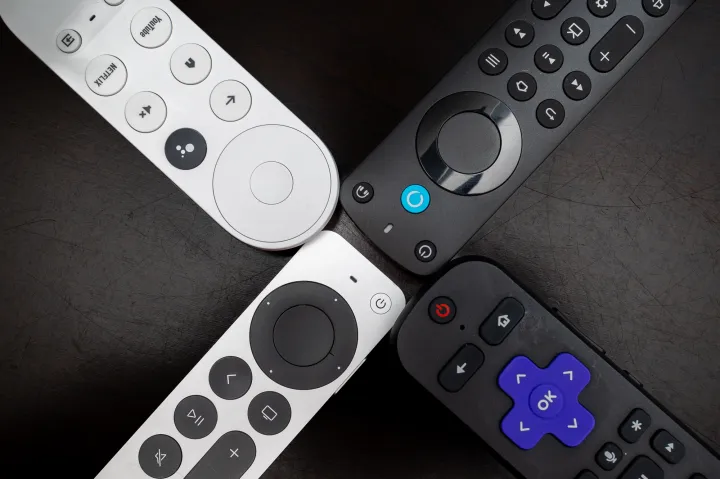
Identify how to pause, resume, adjust sound and return to the programme. Keep a short instruction using the labels visible on the controls. Let another household member try it without help. Confusion at this stage can reveal that a setting is technically available but difficult to find during ordinary viewing.
Avoid putting every advanced control into the everyday guide. People need a reliable route to common actions, not a manual for the whole system. If different activities change the television’s input, explain how to restore the usual arrangement. Give the controls a predictable place so finding the remote does not become the first obstacle.
Listen before raising the volume again
Confirm which device produces the sound and which remote controls it. Start at a comfortable level and ask what specifically is difficult to follow. Check whether the issue appears across different programmes or only in one case. Follow the relevant product guidance for any adjustment, preserving a baseline you can restore.
Keep the needs of other viewers in the discussion. Subtitles, seating and an understood sound arrangement may each help with different problems. Do not assume that a single change resolves everything. If a symptom persists, record it clearly and contact the organisation responsible for that part rather than changing several unrelated settings.
Include these needs in the subscription comparison
Use the Trex IPTV pricing page to investigate published options and confirm the applicable period, currency and conditions. Compare the arrangement that fits the household’s actual viewing requirements. Keep any separately identified application cost visible. A lower headline price does not answer a question about readable controls or a particular language.
Do not commit based only on a broad feature label. Keep essential requirements beside the confirmed answers and ask about gaps before purchasing. Save the order details if you proceed. That gives a later support question a clear reference instead of relying on somebody’s memory of what the offer seemed to imply.
Be precise when helping other customers
A business considering account supply should review the Trex IPTV reseller information and establish its support responsibilities directly. If customers ask about accessibility or language, describe what has actually been confirmed for their programme and device. Avoid promising universal compatibility or identical controls across every setup.
Keep examples free of private customer information. Record the specific requirement and the source of the answer so another support person can understand it. A practical explanation should help the customer make a decision without inventing a capability that the business has not established.
Review comfort after ordinary use
Keep a note of the original concern and the change tried. This gives a later support conversation useful context without requiring the viewer to demonstrate the same difficulty repeatedly. Record whether the person found the change helpful.
Ask how the arrangement feels after a normal evening, not just during a demonstration. Update the household guide if a useful control is difficult to remember. Keep settings understandable when several people share the screen.
Comfortable viewing comes from matching a programme, an account and a usable interface to real people. Subtitles and playback controls deserve the same attention as price and device access. Checking them early helps turn a technically functioning setup into one the household can use with confidence.