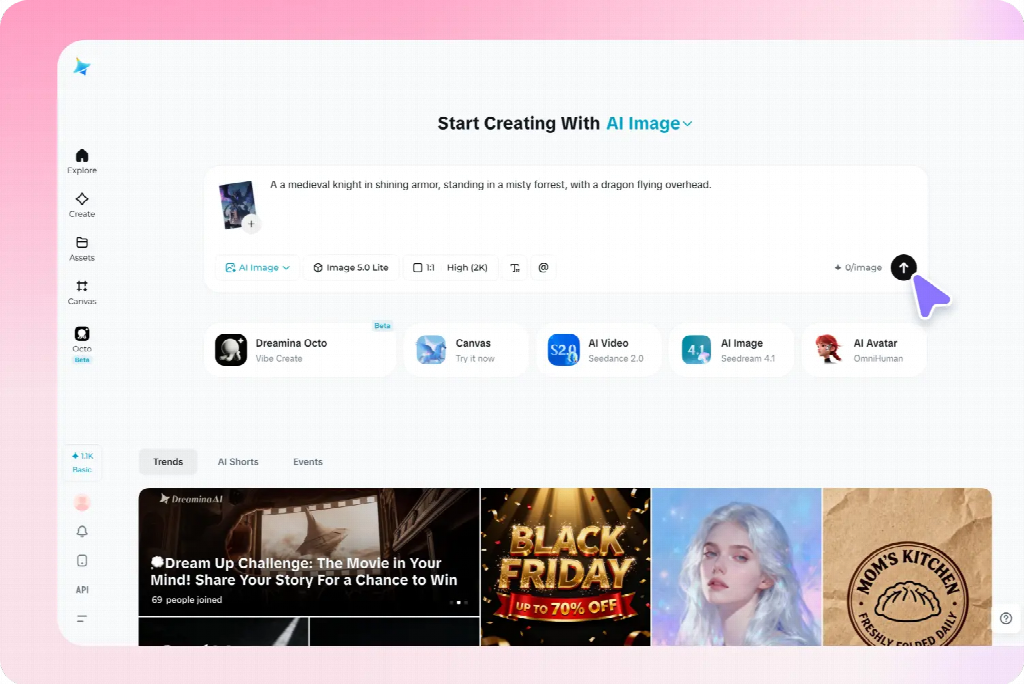
A picture can look sharp in a preview yet become soft, awkwardly cropped, or difficult to read in its final placement. When choosing settings in an online ai image generator, start with the destination rather than the largest resolution label. Dreamina combines text and reference-image generation with aspect-ratio and resolution choices, plus creative upscale, Remove, and Expand tools for refining a selected result.
These controls address different problems. A larger pixel grid may help with enlargement, while a different frame may solve a composition problem. Removing a distraction may improve clarity without changing either. The following questions explain how to choose between those decisions for websites, social graphics, presentations, and print.
Does “high resolution” tell me whether an image will work?
Resolution is useful only when its meaning is clear. Pixel dimensions describe the image grid: for example, 3,600 pixels across and 2,400 pixels high. Aspect ratio describes the relationship between its sides. Physical dimensions describe how large it will appear when printed. A single quality label does not establish all three.
For a screen placement, the exported pixel dimensions matter alongside the size at which the image is displayed. A small file stretched across a large area may reveal softness. A large file reduced to a tiny card may contain details that no longer contribute anything. The useful question is whether important information remains clear in the final presentation.
For print, pixels per inch, or PPI, connects the image grid to physical size. Printer dots per inch, or DPI, describes a different part of the production process. Changing a printer setting does not create missing detail in the source image. Keep these terms separate when discussing requirements with a provider.
Also distinguish detail from correctness. An image can contain many pixels and still show malformed objects, invented lettering, or an incoherent perspective. Those problems need an image decision before a size decision. Enlarging the same structure can make the error more visible instead of making the artwork more useful.
Should I choose the shape before generating?
Usually, choosing a shape close to the main destination makes composition easier. A landscape header, square card, and portrait panel leave different amounts of space around the subject. The same description may need different subject placement in each. Requesting a large square and deciding everything later can leave an avoidable crop problem.
In the image workflow, a written prompt can establish the intended subject and layout, while a reference photo supplies a visual starting point. Available models include Seedream 5.0 Pro and other image models, allowing different interpretations of the brief within the same platform. Choose the available aspect ratio and resolution before generation, then compare the resulting composition with the actual destination.
Specify relationships that the layout depends on. Leave space beside the subject if words must sit there. Avoid placing essential features against an edge if a responsive layout may crop the picture. A reference can communicate appearance, but the prompt should still explain which relationships need to survive.
The primary use should guide the first version. If several destinations are equally important, plan separate compositions rather than expecting one frame to accommodate every shape. The versions can share a subject and visual treatment while differing in placement. This is a composition decision, not evidence that one resolution setting is inadequate.
How much of the image survives cropping?

Cropping removes part of the available grid. A 3,600-by-2,400 image can produce a square crop of at most 2,400 by 2,400 pixels without adding content. Calculations made from the original width no longer describe that square. Always use the dimensions remaining after the approved crop.
At 300 PPI, a 2,400-pixel side corresponds to eight inches. At 200 PPI, it corresponds to twelve inches. These are arithmetic relationships rather than promises about print quality. The artwork, viewing distance, material, and production process still influence whether the result looks appropriate.
Composition can be the limiting factor before pixel count becomes a problem. A technically large crop is unhelpful if it removes a face, a necessary object, or the relationship the image was meant to explain. Inspect the content inside the crop before calculating how large it could be reproduced.
When the intended shape consistently excludes essential content, choose between a new composition and expansion. Expand extends the scene beyond its existing boundaries, whereas cropping discards content. It can create room around a subject, but inspect the added material for consistency. More canvas is useful only when the resulting scene still makes sense.
Can changing the PPI setting make a small image suitable for print?
Changing the PPI value without resampling leaves the pixel grid unchanged. It changes the implied physical size rather than supplying additional image information. A 2,400-pixel side divided by 300 gives eight inches; divided by 150, it gives sixteen. The same pixels are being distributed over different distances.
The reverse calculation is equally useful. Multiply the desired size in inches by the intended PPI to estimate the pixel dimensions required. For a ten-by-eight-inch image at 300 PPI, the arithmetic gives 3,000 by 2,400 pixels. If working in centimeters, convert consistently using 2.54 centimeters per inch.
Do not turn that calculation into a universal instruction to print everything at 300 PPI. Different products and viewing conditions can have different requirements. Obtain the provider’s specifications and calculate against those. A large display viewed from farther away and a small print examined closely present different questions.
A proof should answer the uncertainty that remains. Printing the entire image at a reduced size may conceal the detail problem you need to inspect. A representative crop reproduced at the planned output scale can be more informative. A provider’s proof can also reveal production characteristics that an ordinary home print cannot reproduce.
When should I upscale, edit, or generate again?
Use enlargement when the composition works but the available output needs more pixels for its intended use. Creative upscale is one of the platform’s refinement options. Compare the enlarged version with the original rather than assuming the larger file is automatically better. Inspect edges, textures, faces, and repeated details that carry meaning.
Use a targeted correction when a local issue is weakening an otherwise useful image. Interactive editing supports directing changes to selected areas, while Remove addresses unwanted elements. These functions serve a different purpose from enlargement. They can help clean the source before its quality is judged at a larger size.
Use a new generation when the overall viewpoint, arrangement, or subject is unsuitable. Repeatedly processing a poorly matched source can consume effort without solving the underlying problem. A closer composition may communicate more clearly than enlarging a wide image in which the important subject occupies very little space.
Keep the original while comparing alternatives. Enhancement can reinterpret fine detail, and stronger edge contrast can create an impression of sharpness without repairing structure. Judge the versions at the intended output scale and against the task. Accurate recognizable features matter more than a texture that looks impressive only at extreme zoom.
Why does a good source look soft after upload?
First compare the downloaded file with the version displayed by the destination. If the source looks clear and the uploaded version looks soft, investigate resizing, compression, and the version selected by the page or application. Generating again may not address the processing step responsible for the difference.
Check the dimensions of the asset actually being delivered. An upload system may create several variants, and a preview may display one that differs from the original. Also check whether the layout stretches the image beyond its useful size. Diagnose the displayed result rather than judging from an upload confirmation alone.
Look at the surrounding design as well. Tiny text, weak contrast, and a subject that is too small can appear to be resolution problems. Making the file larger does not necessarily make the final information easier to perceive. Adjust the composition or set important wording as separate text when that gives better control.
For web use, balance visible quality with an appropriate file for the placement. Keep a high-quality master, then prepare the delivery version for its actual role. A very large source can remain useful for future work without being the most appropriate file to send to every small image slot.
What should I approve before calling the image ready?
Approve the crop, pixel dimensions, and destination together. A file can meet a size requirement while containing the wrong framing. A composition can look excellent while leaving too few usable pixels for the planned print. Recording both makes it easier to identify which uncertainty has actually been resolved.
Review important details at realistic scale. Extreme zoom is useful for diagnosing defects, but it does not reproduce normal viewing conditions. Equally, a small preview can hide weaknesses that become obvious in print. Use the view that corresponds to the decision, then inspect closer where the result raises a specific concern.
For a digital layout, include the final wording and surrounding page or slide. For print, include the physical size and production requirements. These checks prevent a technically adequate image from being approved in isolation while its actual use remains untested. A resolution label is one piece of information, not approval of the whole design.
Keep the approved export linked to its working source and intended destination. If a later request changes the shape or output size, revisit the crop and calculations instead of assuming the old approval transfers automatically. The best size is the one that preserves the necessary information at the point where people actually encounter the image.